When the Graph Transformer is docked, it provides a property box much like the Properties View and is a wonderful shortcut to constantly opening the Graph Transformer dialog via the Tools -> Geometric Transformations menu.
However, it has behavior different from the Properties View which I would consider a bug.
If I select a node, select Width in the Properties View, and then type a new number, the number that was originally there is cleared first. So if the Width currently is set to "30.0" and I type "60" then the box will read "60.0" like you'd expect.
However, with the Graph Transformer, when you type a new number with the Horizontal Distance selected, instead of replacing the value with what you type, it appends to the value. So if the value is originally "10.0" and I type "15" then the value will read "10.015", as shown in the image below.
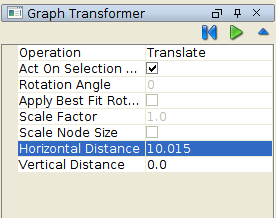
This means that the user must type backspace several times before entering a new value.
